
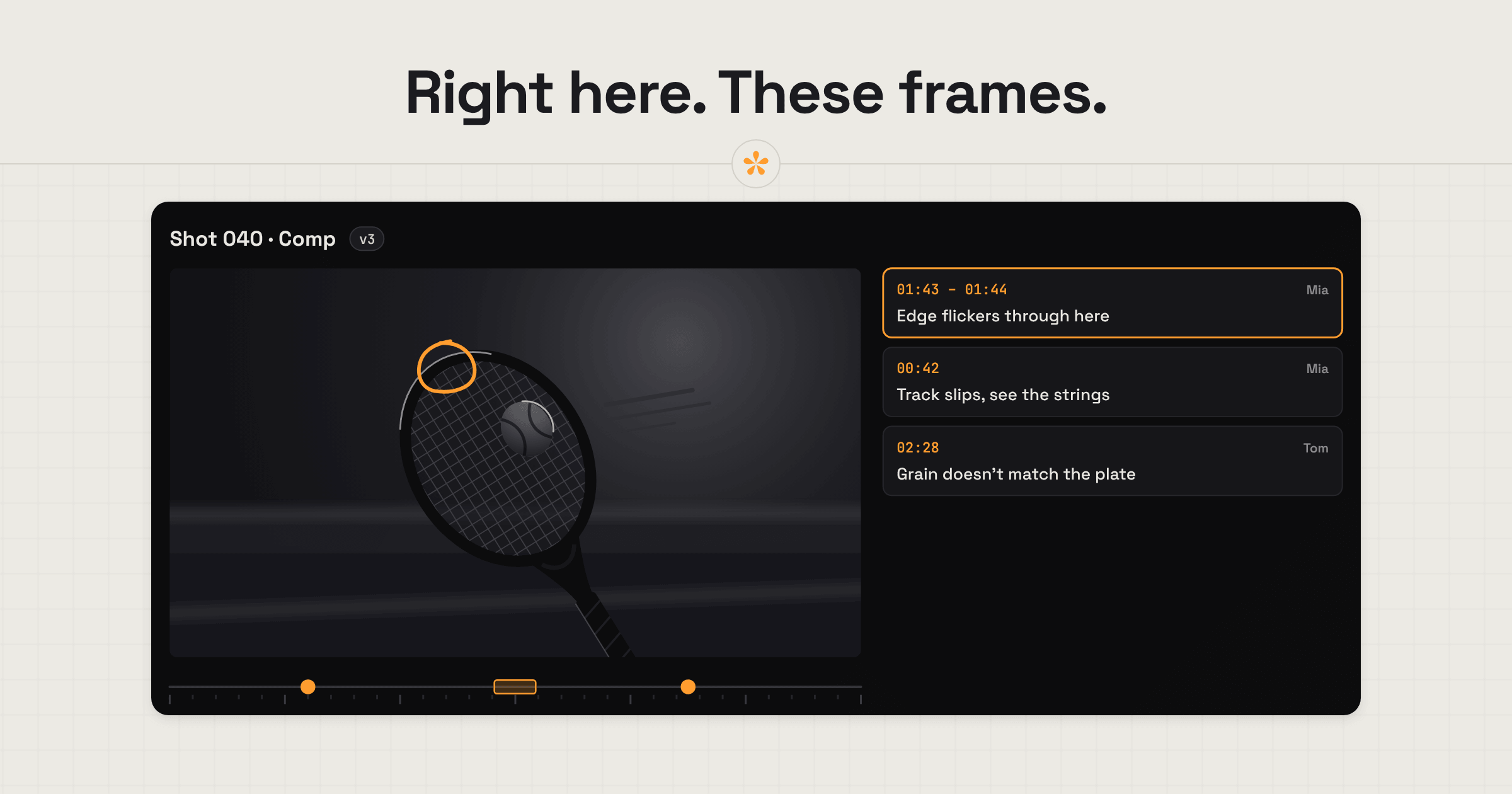
VFX artists need precise feedback on both the timing and placement of effects. SceneNote lets directors, editors and clients draw directly on frames to show what needs changing, and use range notes for problems like a slipping track or flickering edge. Uploading the shot allows frame-by-frame review, while each new iteration stays under the same link, with its own notes and approval.
The short version
- Upload the shot to its own project, so frame stepping is exact.
- Send the review link to the director, editor or client.
- They pause on the exact frame and draw where the effect goes or what's wrong.
- A range note covers a problem that runs across several frames.
- Work through the notes in the review room.
- Add each iteration as a new version on the same link.
- The shot is approved, and the approval is recorded.
ON THIS PAGE · 7 SECTIONS
Where does VFX feedback go wrong?
VFX feedback goes wrong when it isn't precise enough. VFX work happens at the level of a few pixels and a few frames, so a vague note can cost a whole iteration.
Not specific about where in the frame
“Can the effect spread out a bit more?” Over more of the image, but how far, and in which direction? Drawing on the paused frame, with a pen or an arrow, shows exactly where the effect should reach, where the problem is or where an element should go.
The reviewer doesn't know what changed
VFX shots usually go through many iterations, and each one tends to deal with one thing at a time: the track in v3, the edge in v4. If the reviewer doesn't know what changed, they review the whole shot again, or comment on something that isn't finished yet. A pre-watch note fixes that: before they press play, tell them what's changed and what to look at. “v4: the edge flicker is fixed. Please check the left side from 0:02.”
Notes without a frame
“The track slips somewhere in the middle.” On a SceneNote review link the note box pauses the video and stamps the time, and on uploaded shots the comma and full stop keys step one frame at a time, so the note lands on the exact frame.
Problems that run across several frames
A slipping track or flickering edge isn't on one frame. A range note covers a start and an end, and loops when you open it, so you see the problem play out.
Compression hiding detail
A link to a heavily compressed copy can hide exactly the detail you're being asked about. Upload the shot rather than linking to it where detail matters.
Small changes stacking up
VFX shots go through a lot of small iterations. Each version keeps its own notes, so you can always see what was asked for at each step.
Subtle changes are hard to spot
A lot of VFX changes between iterations are minor and subtle: a slightly cleaner edge, a softer shadow, a track that's a pixel steadier. Watching v3 and then v4 one after the other, they're easy to miss. Seeing the two versions side by side makes them much easier to spot and compare. On Pro, you can compare two uploaded versions side by side in sync or with a wipe, stream uploads in 4K so the detail holds up, and let the editor download the original file.
How do editors brief VFX artists?
Editors working with VFX artists need to be very specific about placement in the frame. These are the tools that help most.
- Drawing on the frame for exact placement: “the screen replacement goes inside this edge”, “the logo sits here”.
- Range notes for the frames affected, so the artist knows where the shot starts and stops mattering.
- References in an image set: a still of the look you're after, with notes pinned on the spot.
- Links in notes to a reference shot on YouTube or Vimeo, or to another SceneNote project, shown as chips that open in a new tab.
What does a typical VFX shot review look like?
A typical VFX shot review in SceneNote runs from the first comp to an approved shot on one review link.
- Upload the comp or shot. Frame stepping is exact on uploads.
- Notes and drawings on the exact frame from the director, editor or client.
- Range notes for problems across several frames.
- Work through the notes in the review room, replying where you need more.
- Add each iteration as a new version on the same link. Older versions stay there, with their notes, if you need to go back to one.
- Approval. The shot is approved, with the name and date recorded.
- Back to the edit. Once the shot is approved, the editor can download the final comp, the original file, straight from SceneNote (with original downloads switched on) and drop it into their editing software.
What is SceneNote for, and not for, in VFX?
SceneNote is for review: notes, drawings, versions and approvals on a shot. It isn't a shot-tracking or pipeline tool, so it doesn't manage shot status across a whole show, assign tasks or track renders. For a big VFX show with hundreds of shots, that's a job for a dedicated shot-tracking tool, with SceneNote handling the review of each shot.
What does this look like on a real project?

I don't do a lot of VFX. Most of it is clean-up, basic compositing and the odd sky replacement, which are usually quick and don't need many revisions. Bigger compositing is different. It takes time, so you do mock-ups before the final render, and that can mean a lot of iterations.
The client's notes would come to me, I'd repackage them so the VFX artist could understand them, and pass them on. Sometimes something wasn't possible, the artist would explain why, and I'd repackage that for the client. Being the go-between leaves a lot of room for broken telephone.
Clients find it hard to describe VFX changes. Drawing on the frame would have helped with repositioning things or circling what they weren't happy with, and some clients are more comfortable explaining something they don't fully understand in a voice note than in writing.
References came by email, spread over different threads, and were hard to keep track of. Looking back, I'd want it all in one place: the client's own words next to my version for the artist, so the three of us can talk it through right there, and every version from v1 to v6 to compare, to see what improved and where we'd gone too far.
Which guides help VFX artists most?
- How to leave timestamped comments on a video (worth sending to the director or client)
- How to compare two versions of a video side by side
- How to manage versions of a video edit
- How to get client notes into your editing software
FAQ
Can I review a single shot rather than a whole edit?
Yes. Upload the shot to its own project and send the link. Each shot can have its own versions and its own approval.
Is frame stepping exact?
On uploaded shots, yes: the comma and full stop keys step one frame at a time. On YouTube and Vimeo links it's close but not perfect, so upload anything frame-critical.
Does SceneNote track shot status across a show?
No. Within a shot, resolved notes and approvals show what's done. Across a whole show, a dedicated shot-tracking tool is the better fit.
Do directors and clients need an account?
No. They type their name the first time they leave a note or draw. There's no account, invite or app.
What's the simplest way to get feedback on a VFX shot?
Upload the shot, ask the reviewer to draw on the exact frame and mark problems across frames with a range note, add each iteration as a version and get the shot approved on the same link.
Exact placement, frame by frame.
Pinpoint issues, compare iterations and get each shot approved, all under one review link.
Related guides
Bryn North
Filmmaker and creative director · part of the team behind SceneNote
Bryn North is a filmmaker and creative director who has been making films since 2013, mostly documentaries and travel films, with a soft spot for stories about cultural heritage. He has directed, shot and edited launch films for DJI, worked with brands like Audi and Samsung and with a number of tourism boards, and some of his personal travel films have had millions of views. Working with a new client almost every month, he found that most of the job was communication, and that every client gave feedback differently. SceneNote is his answer: one simple way for clients to leave detailed notes and talk them through.
More guides by Bryn →