
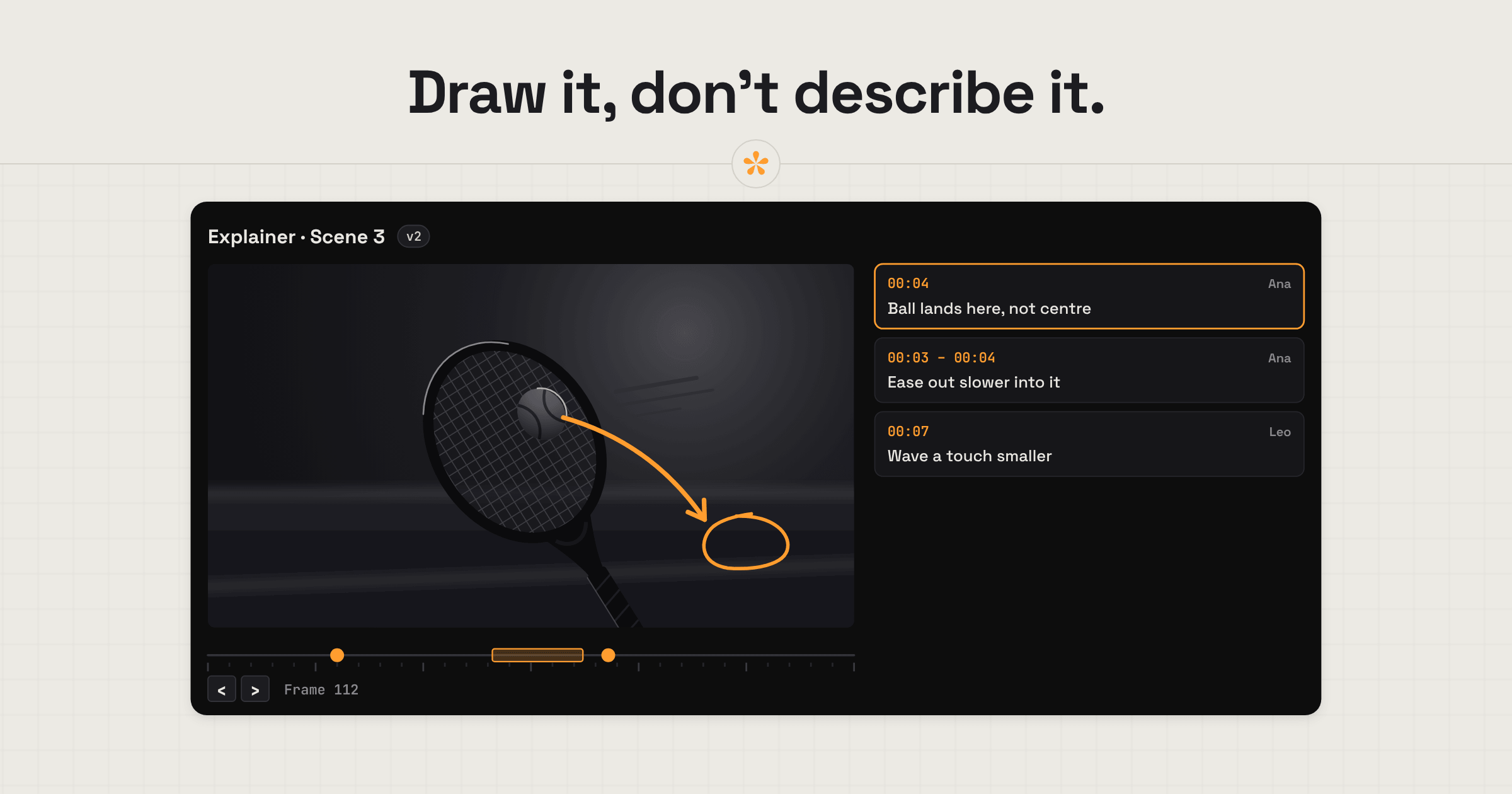
Motion designers and animators need feedback that's specific about both timing and what's happening on screen. SceneNote lets clients pause an animation, draw directly on the frame to show what needs changing, and mark time ranges for movements or transitions. Keep styleframes and references in image sets, add each iteration as a new version, and get approval before moving to the next stage.
The short version
- Put references, style guides and style frames in an image set.
- Let the client pick a direction with a poll.
- Upload the animatic or first pass and send the review link.
- The client pauses on the exact frame and draws on what should change.
- Work through the notes in the review room.
- Add each iteration as a new version on the same link.
- The client approves before you move to the next stage.
ON THIS PAGE · 8 SECTIONS
Where does motion design feedback go wrong?
Motion design feedback goes wrong when it isn't specific enough. Animation changes frame by frame, so a note that doesn't say when and where in the frame leaves you guessing.
Notes without the moment or the object
“The animation feels off.” At which frame, and which part of it? On a SceneNote review link, the client pauses on the exact frame and draws on the area or object they mean.
“It feels slow” with no frame
Timing notes are the hardest to act on. A range note covers the whole move, from where it starts to where it should end, and loops when you open it, so you can watch the easing over and over.
Boards approved, then reopened
A client signs off the styleframes, then asks for a different look halfway through animation. An approval on each stage, recorded with a name and a date, makes it clear what was agreed and when.
The style guide lives somewhere else
Pointing everyone back to a style guide in every round gets tiresome and repetitive, especially when it's a PDF in someone's inbox. It's much easier with one dedicated place for references: an image set holding the style frames, characters and style guide, where everyone can see them. Paste a link to it in a note on the video project, and anyone can open it in a click.
Why does drawing on the frame matter so much for animation?
Drawing on the frame matters because so much motion feedback is about position, direction and space, which are hard to describe in words. There's often a lot going on in a frame, too, and the note is about one very specific part of it, so drawing on it works far better than trying to describe it. In SceneNote, pause the video and draw with a pen or an arrow, in four colours, with undo and redo.
- Where something should land: an arrow from the logo to its final position.
- Which element: a circle around the character's hand, not the whole character.
- Direction of a move: an arrow showing the camera should push in, not pan.
- Safe areas: a line showing the text is too close to the edge for a vertical crop.
On uploaded videos, the comma and full stop keys step one frame at a time, so the client can find the exact frame before drawing.
How do you keep the look consistent across a motion project?
To keep the look consistent, keep the references, style guides and characters in an image set where everyone can see them. It helps the client judge each new iteration against what was agreed, and it helps you keep continuity across shots and episodes.
That matters even more for AI-generated content, where consistency and continuity are hard to hold from one shot to the next. A shared set of characters and style frames gives everyone the same reference to check against.
What does a typical motion design job look like, start to finish?
A typical motion design job in SceneNote moves through clear stages, with an approval at the end of each before the next begins.
- References and styleframes. Put them in an image set, and ask the client to pin notes on what they like.
- Pick a direction. If there are two or three looks, add a poll and let the client choose.
- Animatic. Upload it with a scratch voiceover if you have one, and ask for notes on timing and story.
- Notes on the exact frame, with drawings. Work through them in the review room, replying where you need more.
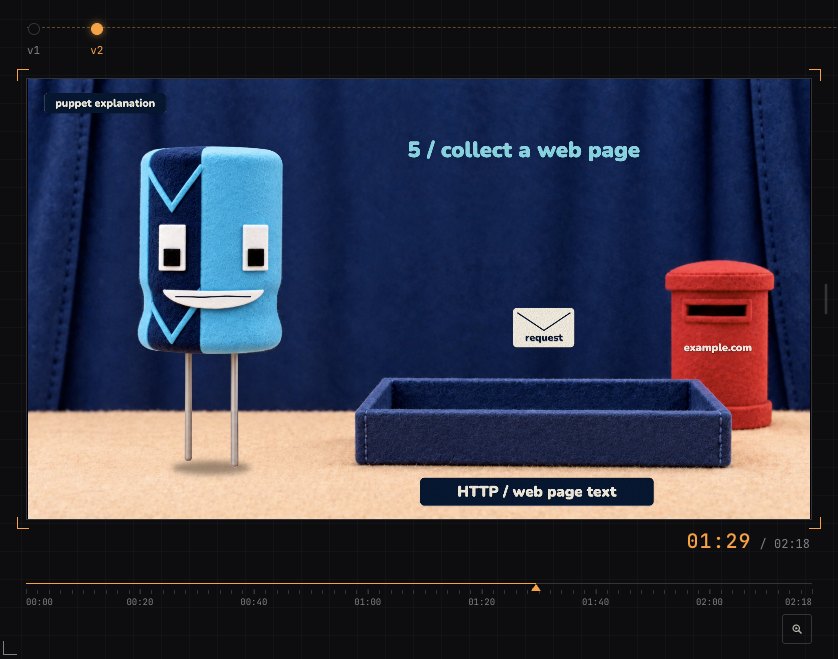
- Iterations as versions. Small changes stack up, so each round goes on the same link as v2, v3 and so on.
- Approval. The client approves the stage, and that's your signal to move on.
How do you go back to an earlier look?
To go back to an earlier look, open the earlier version on the same link. Every version stays in the project with its own notes, so you can see what the animation looked like then and what the client said about it. On Pro, you can also compare two uploaded versions with a wipe or side by side.
How do you share a reference in a note?
To share a reference, paste a link into a note: another SceneNote project, a YouTube video, a Vimeo link or a site. Links in notes show as chips with the site's name, and open in a new tab, so the client can see the reference next to the moment it's about.
Which guides help motion designers and animators most?
- How to send images alongside a video
- How to let a client choose between edit options
- How to manage versions of a video edit
- How to compare two versions of a video side by side
FAQ
Can clients draw on the video?
Yes. They pause on the frame and draw with the pen tool or an arrow. On a phone they draw with a finger.
Is frame stepping exact?
On uploaded videos, yes. On YouTube and Vimeo links it's close but not perfect, because those players don't share the exact frame rate, so upload the file for frame-critical notes.
Can I review styleframes before I animate?
Yes. Put them in an image set, and the client pins notes, drags an area or draws on each one, and can vote in a poll.
Can the notes go into After Effects?
Not directly. SceneNote exports markers for Premiere Pro and DaVinci Resolve, plus a CSV of every note with its timecode, which works as a checklist next to any other software.
What's the simplest way to get client feedback on an animation?
Agree the look in an image set first, then send each iteration on one review link, ask the client to draw on the exact frame, add each round as a version and get an approval before every new stage.
Draw it on the frame.
Let clients show exactly what needs changing, review each iteration and approve the final animation.
Related guides

Kiril Dobrev
Filmmaker · part of the team behind SceneNote
Kiril Dobrev is a filmmaker with 15 years of experience and a passion for documentary and travel. He’s spent a lot of that time in the editing room, obsessing over how to make his workflow better, and the feedback loop has always been a big part of that. Post-production still hasn’t had a good enough answer to it. SceneNote was born from that, with one simple idea: make feedback better.
More guides by Kiril →