
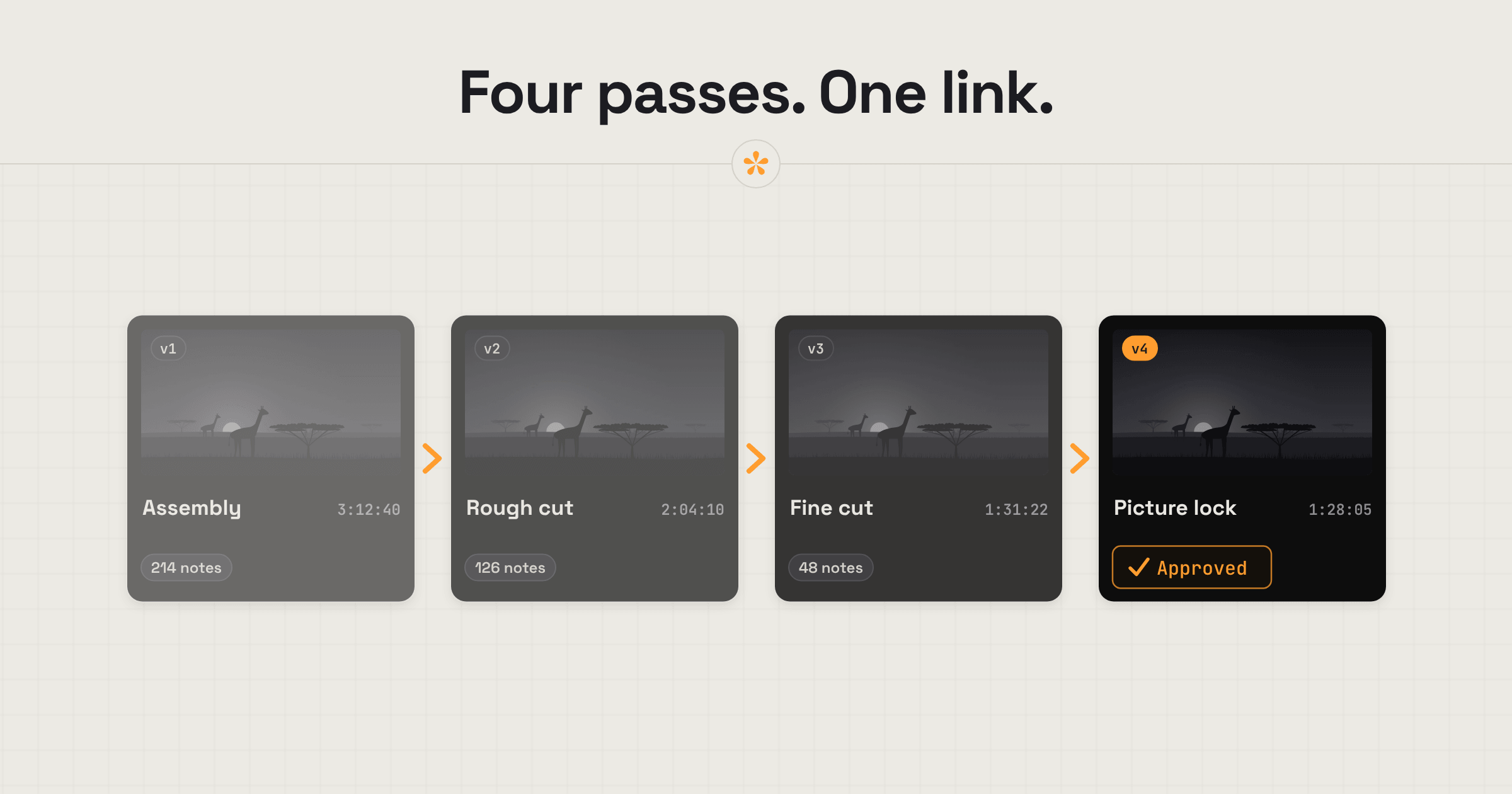
Documentary filmmakers often work through long cuts, hundreds of notes and feedback from directors, producers and contributors. SceneNote keeps each pass of the edit under one review link, with comments pinned to exact frames and attached to the version they belong to. Searchable transcripts help find specific interview quotes, while reviewers can leave feedback and approve cuts without creating an account.
The short version
- Upload the cut to a new project, and run a transcript if you want one.
- Add a pre-watch note saying what this pass is for.
- Send one review link to everyone who needs to see it.
- Reviewers leave notes on the exact frame, and range notes on whole scenes.
- Work through the notes in the review room, and export them as markers if that helps.
- Add each pass (assembly, rough cut, fine cut, picture lock) as a new version.
- Get picture lock approved, with every name and date recorded.
ON THIS PAGE · 8 SECTIONS
Where does documentary feedback go wrong?
Documentary feedback goes wrong mostly because of scale. The cuts are long, the notes can run into the hundreds, and the people reviewing range from directors to funders.
Hundreds of notes on a long cut
Say a 96-minute cut comes back with 280 notes from three people. In an email or a spreadsheet, that's days of matching notes to moments. On a SceneNote review link, every note sits on its exact frame, you resolve each one as you go, and what's left is always clear. The CSV export gives you the full list, with status and replies, if you want to track it outside SceneNote.
Producers, funders and contributors all reviewing
Each of them is looking for something different, and some only need to approve. Everyone on the same link sees everyone's notes, so points don't get made twice, and a pre-watch note can tell each group what you need from them.
“Where does she talk about the funding?”
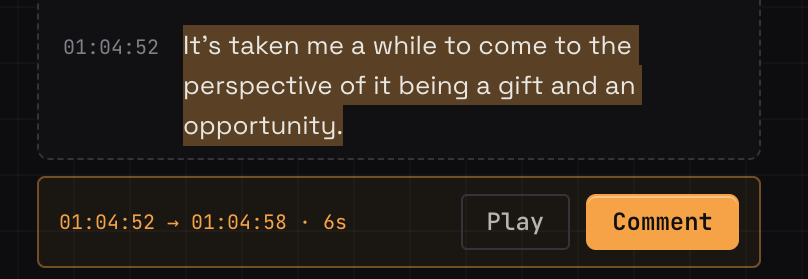
On a documentary, a note often refers to something said rather than something seen, and finding it in hours of interviews means a lot of scrubbing. With a transcript on the cut, search for the word and jump straight to every place it's mentioned, then leave the note right there.
Notes on the wrong version
On a project with many passes, it's easy to get a note on a cut you've already changed. Each version in SceneNote keeps its own notes, older versions go read-only, and the review link always opens on the latest one.
What does a typical documentary review look like?
A typical documentary review in SceneNote follows the passes of the edit, with each one added as a version on the same review link.
- Assembly. Often an internal pass, for you and the director or producer only. Keep it in its own project if the notes shouldn't be seen later.
- Rough cut. The story and structure. Ask in the pre-watch note for notes on what works, what drags and what's missing.
- Fine cut. Timing, shot choices and the details.
- Picture lock. The final edit, approved by whoever needs to sign it off, so sound and the grade can start.
At every pass, reviewers leave timestamped notes, range notes for whole scenes and drawings on the frame, and the transcript lets them quote exactly what was said. Work through the notes in the review room. If you'd rather see them in your edit, export them as markers for Premiere Pro or DaVinci Resolve.
How do transcripts help on a documentary?
Transcripts turn hours of interviews into text you can search and quote. SceneNote has transcription built in: press Transcribe on an uploaded cut, and every word becomes searchable, with a timecode you can click.
- Find a quote. Search for a word and jump to every place it's said.
- Turn a line into a note. Select words in the transcript, and they become a note at that moment with the words quoted.
- Subtitles and paperwork. Download the transcript as SRT or VTT, plain text or CSV.
How to transcribe a video or podcast has the steps.
How do you handle contributors and funders?
Contributors and funders often only need to approve, not give a full set of notes. Send them the normal review link with a pre-watch note saying so: “We only need your approval on how you're shown, but you're welcome to flag anything.” Don't turn comments off or use a view-only link for them, because both hide the Approve button.
For a film that isn't released yet, Pro adds a password on the review link, more transcription minutes each month for long interviews, and 4K streaming.
What does this look like on a real project?

I worked on a four-part documentary series that was later picked up by Amazon Prime. It was a pretty complex project, with several editors, creative collaborators, contributors and sponsors involved, all needing to have their say at different stages.
The tricky part was keeping track of it all. During the paper edit and assembly, we went through several rounds internally, sometimes cutting the same scene in completely different ways. By the time everyone else started weighing in, we were dealing with hundreds of notes, on top of our own internal feedback. Most of it came through email chains and group chats, often without a clear reference to the shot or version being discussed.
Looking back, I wish we'd had some of the tools we have now. Being able to search transcripts, keep feedback attached to each version and export notes straight onto the timeline would have saved us so much time. I remember sponsors wanting to check how their clothing appeared on screen, and being able to point to an exact frame would have made those conversations much easier.
That project really showed me how much time can get lost just trying to organise feedback, especially when there are so many people involved.
Which SceneNote feature fits which moment on a documentary?
Documentary filmmakers use these SceneNote features again and again.
| The moment | The feature | Why it fits |
|---|---|---|
| Telling reviewers what this pass is for | Pre-watch note | They read it before pressing play |
| A note about one moment | Timestamped note | Pinned to the exact frame |
| A whole scene that drags | Range note | Covers a start and an end |
| Quoting an interview | Transcript selection | The words become a note at that moment |
| Finding where something was said | Transcript search | Jumps straight to every mention |
| Each pass of the edit | + version | Same link, and each pass keeps its own notes |
| Tracking hundreds of notes | Resolve, and the CSV export | What's left is always clear |
| Notes in your edit | Markers export (optional) | Premiere Pro or DaVinci Resolve |
| Picture lock | Approve | A dated record of who signed off |
Which guides help documentary makers most?
- How to manage versions of a video edit
- How to transcribe a video or podcast
- How to share a confidential video for review
- What to look for in a rough cut vs a final cut (worth sending to producers)
- How to get client notes into your editing software
FAQ
Does SceneNote work for feature-length cuts?
Yes. Upload the cut, or paste a link to it on YouTube, Vimeo, Google Drive or Dropbox. A link uses no storage, but transcription needs an upload.
Is an unreleased documentary safe on a review link?
Review links are never indexed by search engines, and a link only opens its own project. For anything under embargo, how to share a confidential video for review covers the extra steps.
Can contributors approve without leaving notes?
Yes. Anyone with a name can press Approve, and the approval is recorded with their name and the date. A pre-watch note can tell them that's all you need.
Can I get all the notes out of SceneNote?
Yes. Download them as a CSV with timecode, author, note, status, replies and approvals, or copy them all as text. You can also export them as markers for Premiere Pro or DaVinci Resolve.
What's the simplest way to get feedback on a documentary cut?
Upload each pass to the same project so it can be transcribed, send one review link, tell each group what you need from them, and work through the notes in one place.
From first assembly to picture lock.
Keep every cut, note and approval together, with searchable transcripts to find the moments that matter.
Related guides
Kiril Dobrev
Filmmaker · part of the team behind SceneNote
Kiril Dobrev is a filmmaker with 15 years of experience and a passion for documentary and travel. He’s spent a lot of that time in the editing room, obsessing over how to make his workflow better, and the feedback loop has always been a big part of that. Post-production still hasn’t had a good enough answer to it. SceneNote was born from that, with one simple idea: make feedback better.
More guides by Kiril →