
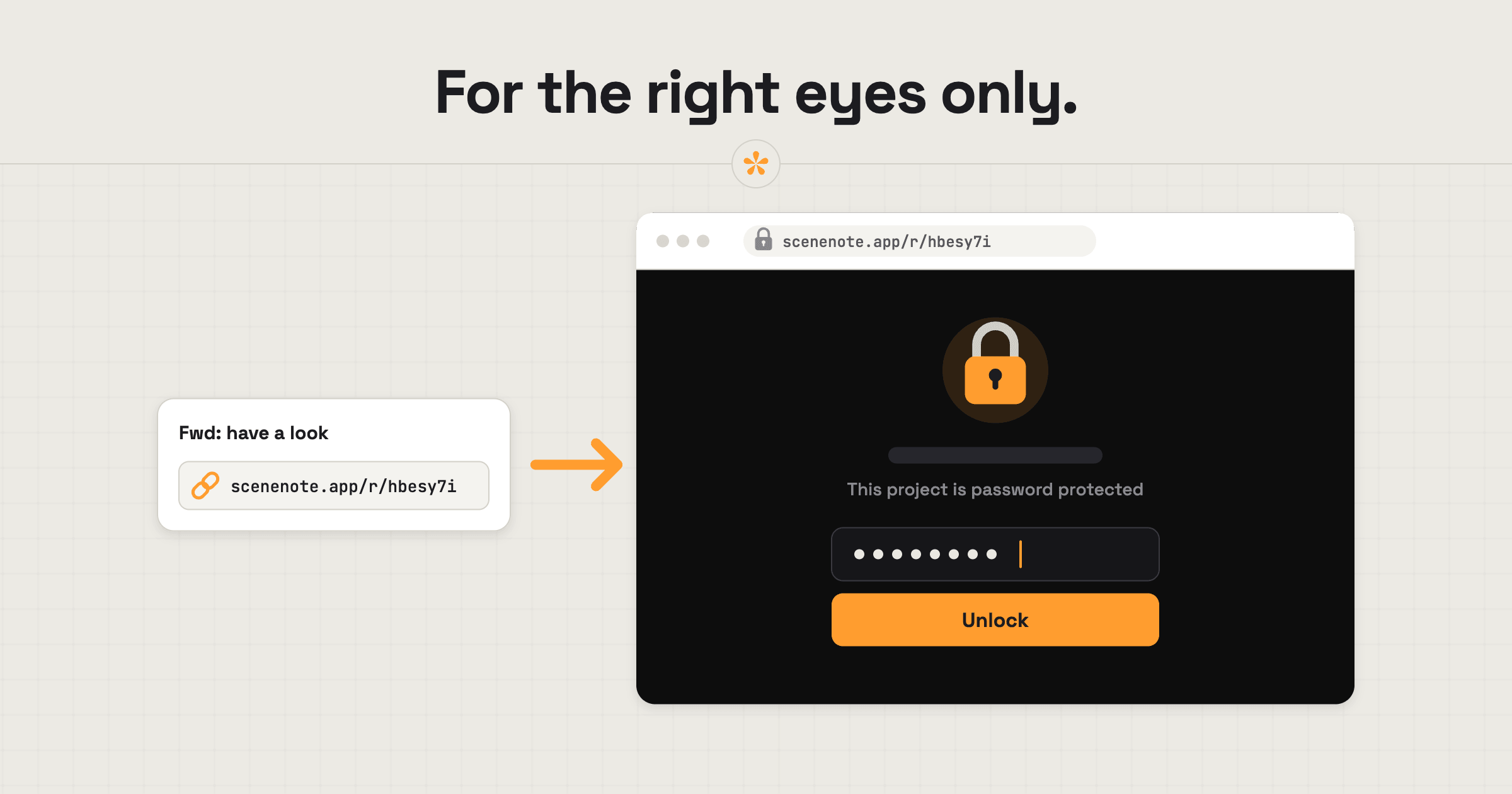
To share a confidential video for review, upload it directly to SceneNote rather than posting it to YouTube, then put the project behind a password (a Pro feature). Only people with the link can open a project, but you can't control where a link gets forwarded. The password is the extra layer: without it, nobody sees anything, not even the title.
The short version
- Upload the video to SceneNote instead of using a YouTube or Drive link.
- Open the project's settings and set a password (Pro).
- Leave Download original off.
- Send the review link and the password separately.
- Check viewer activity to see who has opened it.
- Delete the project when the job is done.
ON THIS PAGE · 7 SECTIONS
When does a video need protecting?
A video needs protecting whenever it shouldn't be seen by anyone outside the review, even by accident. Common cases:
- Any link that might get forwarded. Once a link is out, you can't control where it goes. With a password, someone who gets it by mistake still can't open it.
- Embargoed launches, like an unreleased product or a campaign before it goes live.
- Music videos before release day.
- Internal and investor comms, like results or restructuring news.
- Clients who ask for it, often in their contract.
- Bigger clients in general. Even when nothing is secret, a password shows care, and it's the kind of detail bigger clients notice.
How do you lock a project, step by step?
Locking a SceneNote project with a password takes a few seconds.
- Upload the file to a new project. A YouTube or Drive link still lives on that platform, where its own sharing settings apply.
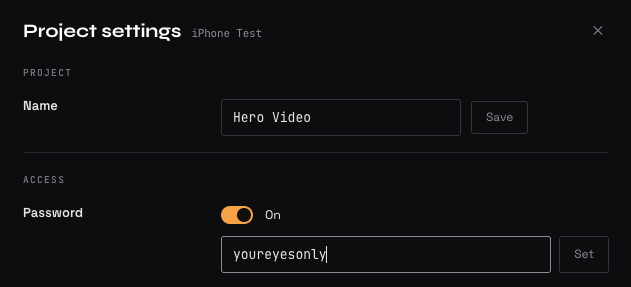
- Open the project settings and toggle Password on.
- Type a password and click Set.
- Send the review link and the password separately.
Password protection needs a Pro account. Projects made without an account can't be locked.
What's on a checklist for confidential reviews?
A confidential review is about more than the password. Here's the full checklist:
- [ ] Upload rather than use YouTube. Unlisted isn't private: anyone with a YouTube link can watch.
- [ ] Set a password (Pro).
- [ ] Leave Download original off, so nobody walks away with the file.
- [ ] Use a view-only link for people who should watch but not comment (Pro).
- [ ] Check viewer activity to see who opened the project and what was downloaded (Pro).
- [ ] Delete the project once the job's done.
Review links are never indexed or crawled by search engines, so the only way someone finds one is if it's shared with them. That's exactly why a password is worth it: it covers the one way a link can get out. And uploaded footage only serves your project and its feedback: it's never used for AI training or sold.
What should you tell the client?
Tell the client the password through a different channel from the link, so a forwarded email doesn't hand over both.
Email: Hi Marta, here's the launch film for review: [review link]. I'll text you the password separately.
Text: Password for the launch film: [password]. Please don't forward the link outside the core team.
What does this look like on a real project?

I've worked on several campaigns for products that hadn't been released yet. On jobs like that, you usually sign an NDA before you even start, and nobody is supposed to talk about the product until the embargo lifts. It's a standard part of working with confidential material.
In the past, we'd share cuts through Google Drive, since it sits on my own business account. But Drive isn't built for feedback, and you can't put a password on a file. A review room I can lock down solves both problems at once.
It also builds trust. Clients want to work with people who are professional and make their lives easier. Taking the extra step of password-protecting a project, even when nobody asked for it, doesn't go unnoticed. It makes you look more dedicated to confidentiality, and it's the kind of thing that brings repeat work.
How to handle common problems
The link was forwarded
If the link went further than it should, change the password. Everyone who's already opened the project is signed out straight away, and only people you give the new password to can get back in.
Someone left the client's company
If a reviewer leaves the client's team mid-project, change the password and send the new one to the people still on the job. Their notes stay in the project.
The client lost the password
If the client can't find the password, send it again through the separate channel. If you'd rather not resend the old one, set a new password and share that instead.
FAQ
Can people see the video's title without the password?
No. Without the password, nobody sees the title, the picture or any notes.
Can I password-protect a YouTube or Vimeo project?
You can lock the SceneNote project, but the video itself still lives on YouTube or Vimeo, where its own sharing settings apply. For confidential work, upload the file instead.
Does changing the password affect existing notes?
No. Changing the password signs everyone out, but every note stays in the project.
Do reviewers need an account to open a password-protected project?
No. Reviewers only need the password, then type a name the first time they leave a note.
How do you share a confidential video for review?
Upload the file, set a password, leave downloads off, and send the link and the password separately. Check who has opened it, and delete the project when the job is done.
Keep confidential cuts behind a password.
Upload your video, protect the link and collect feedback in one place.
Included in Pro.
Related guides
Kiril Dobrev
Filmmaker · part of the team behind SceneNote
Kiril Dobrev is a filmmaker with 15 years of experience and a passion for documentary and travel. He’s spent a lot of that time in the editing room, obsessing over how to make his workflow better, and the feedback loop has always been a big part of that. Post-production still hasn’t had a good enough answer to it. SceneNote was born from that, with one simple idea: make feedback better.
More guides by Kiril →