
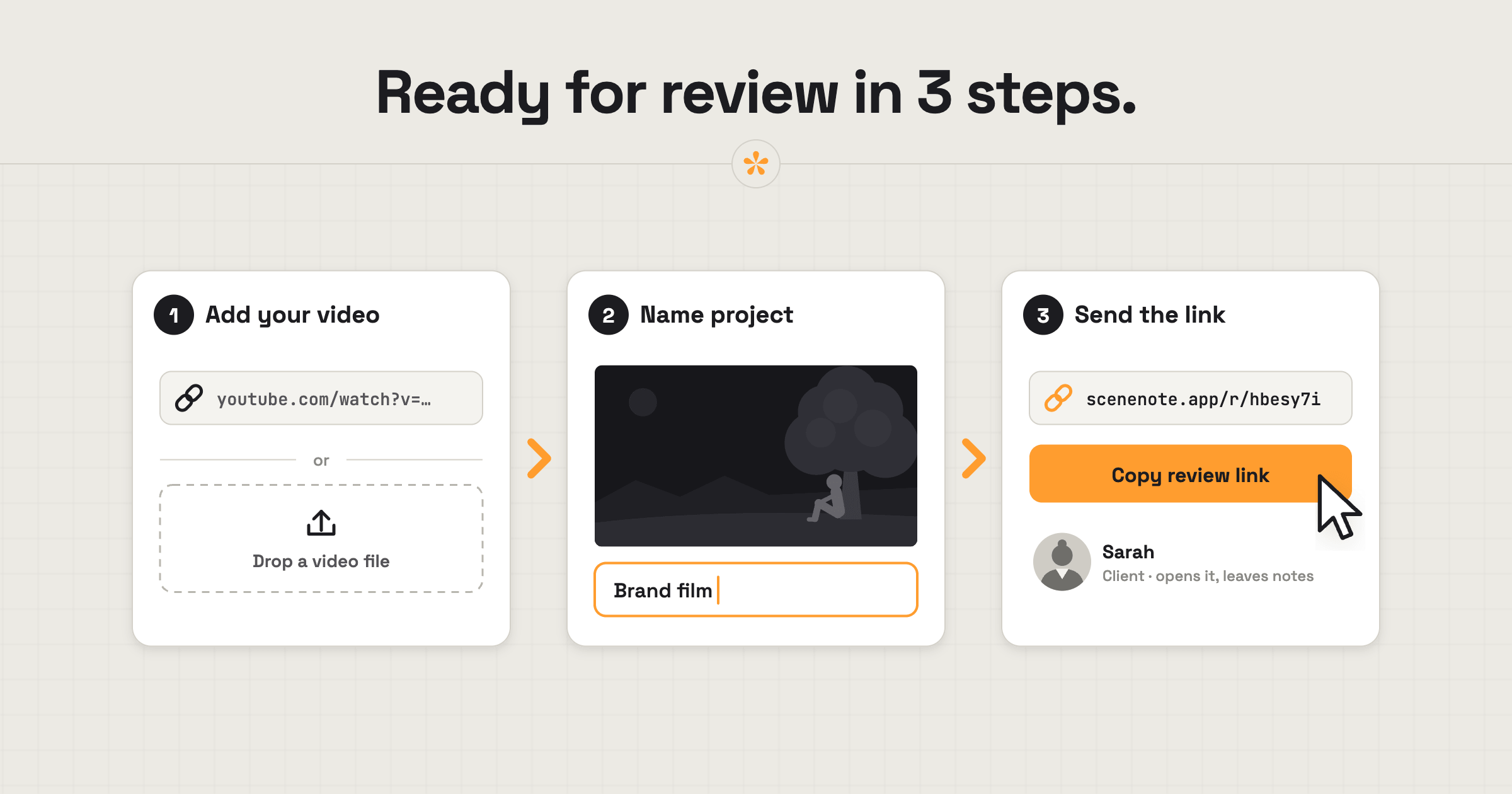
A video review room is one page where your client watches the video and leaves notes on it, instead of replying by email. To set one up in SceneNote, paste a video link or upload a file, name the project and send the review link. Nobody has to sign in or install anything.
The short version
- Paste a link or upload a file on scenenote.app.
- Name the project.
- Send the client the review link.
- (Optional) Add a short pre-watch note, as text or a voice note.
ON THIS PAGE · 8 SECTIONS
Why use a review room instead of sending the file?
A review room keeps the video, every note, every version and the sign-off in one place. Sending the file gets the video there, but the feedback still comes back in pieces. A bare file link can also feel a little offhand, especially with a bigger client. A review room shows you've thought about their side of it.
- Notes land on the exact moment, not “about halfway through”.
- Everyone sees the same list, and every back-and-forth stays under the note it's about, so nothing gets lost between inboxes.
- The next cut goes on the same link, so nobody watches an old one.
- Approval is on record, with a name and a date.
- You decide about downloads, rather than handing over the master on day one.
How do you set up a review room, step by step?
Setting up a review room in SceneNote takes about a minute.
- Paste a link or drop a file on scenenote.app. YouTube, Vimeo, Google Drive, Dropbox and direct .mp4 or .mp3 links all work.
- Name the project something the client will recognise (“Brand film, v1”).
- Check the settings (see below).
- Copy the review link and send it however you normally would: email, chat or text.
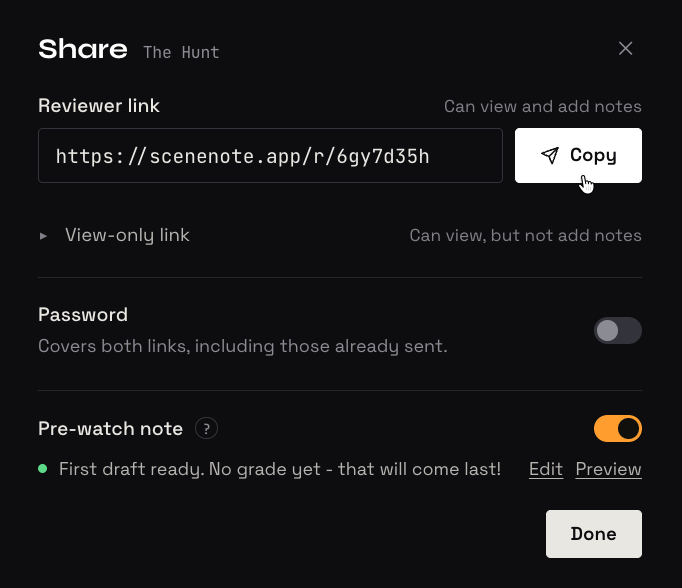
You can also add a pre-watch note saying what you need from them this round. It's optional, and it can be text, or a voice note if that's easier.
What does your client see the first time?
The first time a client opens the review link, SceneNote keeps things simple:
- Your pre-watch note, if you've left one, before they press play.
- A short welcome card inviting them to leave feedback.
- The note box right under the player, showing the moment the note will land on.
- A name prompt only when they leave their first note. No account, no email, no app.
Most clients get going straight away, even if they've never used a review tool. That's on purpose. We've put a lot of thought into the reviewer's side of SceneNote, so it's obvious what to do and where, even if you haven't left any instructions. The easier it is to leave a note, the more feedback you get.
What should you write in the pre-watch note?
Keep the pre-watch note short: what this round is for, what to focus on, and when you need notes by.
Here's the first cut of the brand film.
This round is about story and pacing. Colour grading hasn't been done yet.
Could you leave your notes by Friday? Thanks!
Which settings should you use?
Most review rooms work fine on the defaults. These are the settings worth knowing about.
| Setting | What it does | Plan |
|---|---|---|
| Comments | On by default. Switch off to make the project watch-only | Free |
| Approvals | On by default. The owner can switch them off | Free |
| Close feedback | Locks the project once the round is done; notes stay visible | Free |
| Download original | Lets the client download the full-quality file | Pro |
| Password | Only people with the password can open the project | Pro |
| Your logo | Shows your branding on the review page | Pro |
| Feedback deadline | Shows a deadline and sends reviewers a reminder email | Pro |
Without an account, a project lasts 45 days after its last visit. A free account keeps your projects and adds 5 GB for uploads. See what's in Pro.
What does this look like on a real project?

I freelance, and a lot of my work is editing, so on every project I'm sending cuts and asking for feedback. I'm always a bit wary of clients who aren't comfortable with tools, or who get overwhelmed easily. With SceneNote, I find that I don't need to give them instructions. They just know how to leave feedback, because the tool makes it very obvious.
I keep hearing back from clients that they find the process really useful, and they're keen to keep using it. For me it's a win too: I get the feedback I need, in the way I need it. I can reply to notes and have the discussion right there, and I can manage my versions in one place. It's saved us both a lot of time.
For certain clients, I'll brand the review room with their logo and colours, so it feels almost like a custom workspace for them. It's a nice touch and an easy way to impress!
How to handle common problems
The client replies by email anyway
If the client sends notes by email out of habit, add them to the review link at the right moments, and reply with the link so they can see them there. One round is usually enough for the review room to become the habit.
The link gets forwarded
If the link is forwarded to someone you didn't expect, anyone with it can open the project. For anything sensitive, add a password on Pro; changing the password signs everyone out straight away.
The client watches on a phone
If the client reviews on a phone, that's fine: the review room works in any phone browser, with no app to install. Notes, drawing and voice notes all work there.
A client who isn't comfortable with tech in general
If you know a client struggles with anything on a screen, a short screen recording showing where to click and type can help. You can make one right in SceneNote: choose Add new project, then Record screen, and send it as its own link. It's up to 10 minutes on the free plan and 60 on Pro. Most clients won't need it, but it's a kind gesture for the few who do.
You want them to review now but download later
If the client shouldn't have the master until the invoice is paid, leave Download original off while they review. Switch it on once you're ready to deliver (Pro).
FAQ
Does the client need to sign up?
No. The client never needs an account. They type a name the first time they leave a note.
Do I need an account to make a review room?
No, not for a link project. You can paste a link and create a project without signing up. Uploading a file needs a free account, which also keeps your projects for good.
Can I use my own branding?
Yes, on Pro. Your logo shows on the review page.
Can I stop feedback once a round is finished?
Yes. Close feedback locks the project, and every note stays visible.
How do you set up a video review room?
Paste a link or upload a file, name the project and send the review link. The client watches, leaves notes on the exact moment and approves, all on one page.
Set up a review room in a minute.
No sign-up needed to paste a link.
Related guides
Kiril Dobrev
Filmmaker · part of the team behind SceneNote
Kiril Dobrev is a filmmaker with 15 years of experience and a passion for documentary and travel. He’s spent a lot of that time in the editing room, obsessing over how to make his workflow better, and the feedback loop has always been a big part of that. Post-production still hasn’t had a good enough answer to it. SceneNote was born from that, with one simple idea: make feedback better.
More guides by Kiril →