
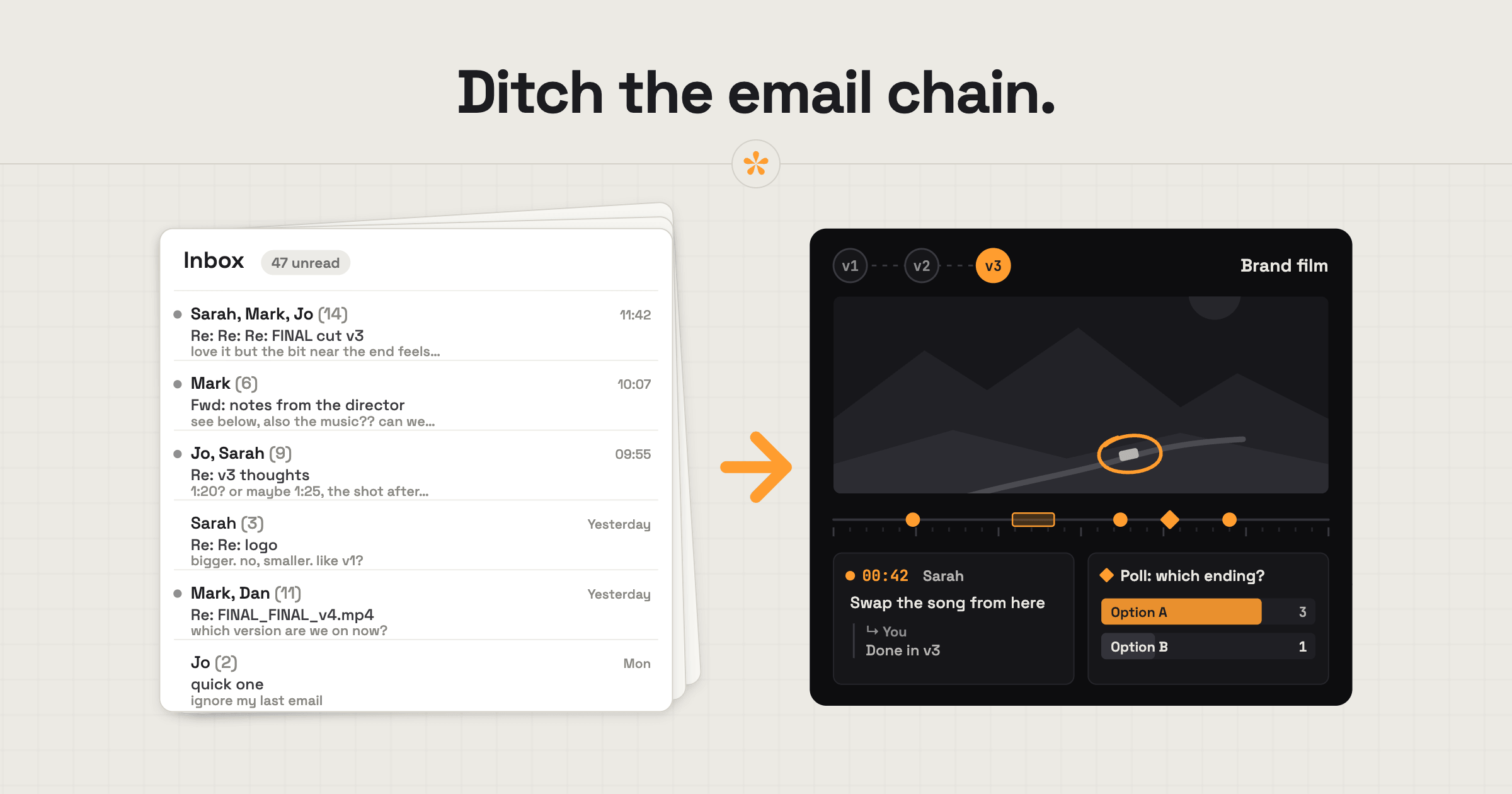
Email is fine for a couple of general comments. For detailed feedback, multiple reviewers or repeated revisions, a dedicated video review tool is usually more practical. It keeps comments attached to exact moments in the video, so editors know what needs changing without searching through long email threads.
ON THIS PAGE · 8 SECTIONS
Is email good enough for video feedback?
Email is good enough for video feedback when the notes are few and simple. The trouble starts with the third reviewer, the second round or the fifteenth note. Notes like “the bit near the start” have to be found by hand, reply-all chains split into side conversations, and v1 notes get answered after you've sent v2. None of that is anyone's fault; email just wasn't built to point at a moment in a video.
Email vs a review link
The main difference between email and a review link is where the note points: to a description of a moment, or to the moment itself. Many editors sit somewhere in between, with a video that has the timecode burnt in and a shared doc of notes.
| Burnt-in timecode plus a doc of notes | A review link | ||
|---|---|---|---|
| Where a note points | A description (“near the start”) | A typed timecode | The exact frame |
| Which version it's about | Often unclear | Depends on the file name | Each version keeps its own notes |
| Several reviewers | Separate threads | One doc, if everyone uses it | Everyone's notes in one place, with names |
| Knowing what's done | Your own list | A column you keep up to date | Resolve each note as you go |
| Getting notes into your edit | Retype them | Retype them | Markers for Premiere Pro or DaVinci Resolve |
The timecode-and-doc method works, and plenty of good editors still use it. It just means every note gets typed twice: once by the client, once by you on the timeline.
The same note, written both ways
Here's one client note, sent by email and then left on a review link.
“Hi! Loved it. A few things: the bit near the start where she walks in feels a bit slow, maybe trim? And the music in the middle is too loud I think. Also can the logo be bigger at the end? Thanks!”
three notes, each pinned to its moment. 0:08 to 0:14 (a range note): “This walk-in feels slow, could it be shorter?” At 1:12: “Music too loud under the interview here.” At 2:41, with a circle drawn round the logo: “Make this logo THIS big.”
Same client, same thoughts. The second version can be worked through in a couple of minutes, and nobody has to guess what “the middle” means.
When is email perfectly fine?
Email is perfectly fine for video feedback in a few situations, and there's no point pretending otherwise.
- A single “great, ship it” on a final version.
- One quick note on a short clip, from one person.
- Logistics: deadlines, invoices, delivery details.
- A client you'll only ever do one tiny job for.
The moment it's more than that, the review link starts paying for the minute it takes to set up.
How do you move a client off email without annoying them?
To move a client from email to a review link, make it sound like less work for them, because it is. Don't call it a system or a tool; call it the link.
Here's the first cut: [review link]
To keep things easy, you can leave notes right on the video: just pause where something feels off and type. There's no account to make, just add your name. That way I'll see exactly which moment you mean, and nothing gets lost in email.
It also helps that email doesn't disappear entirely. Clients can switch on email alerts, and a reply to a SceneNote email lands under the note it's about.
What does the switch look like on a real project?

I used to send clients unlisted YouTube links. Even when there wasn't much feedback, it ended up buried across more than one email, which made it much harder to keep track of. Having all the review in one place gives everyone the big picture: what's been suggested, by whom, and every conversation about it. It saves time for all of us.
And the switch really is easy. I now use SceneNote on several clients' projects, and within one project they're happy with the new way of working. I don't even need to convince anyone; it's a no-brainer. I haven't had to do any hand-holding either: it's so intuitive for them to use.
How to handle common problems
The client replies to the notification email
That's fine. When a client replies to a SceneNote email alert, the reply appears in the project, under the note it was about. Email-loving clients can carry on, and everything still ends up in one place.
Notes arrive as a forwarded chain from the client's boss
When notes arrive as a forwarded email chain, add them to the review link yourself at the right moments, so the round stays in one place. Then send the boss the review link directly for the next round.
FAQ
Can the client still get feedback updates by email?
Yes. Owners and reviewers can switch on email alerts for new notes and replies, and busy projects send a summary instead of an email for every note.
Can I still send someone a list of notes by email?
Yes. Copy all puts every note on the version into a plain list you can paste into an email or a chat, and CSV gives you a spreadsheet.
Is a review link free?
Yes. SceneNote's free plan includes unlimited link projects and unlimited reviewers, with no end date and no card.
So, email or a review tool?
Use email for logistics and the odd one-line note. Use a review link for the actual feedback: every note on its exact moment, every version in one place, and nothing to retype.
Move your next round of notes off email.
No sign-up needed to paste a link.
Related guides
Kiril Dobrev
Filmmaker · part of the team behind SceneNote
Kiril Dobrev is a filmmaker with 15 years of experience and a passion for documentary and travel. He’s spent a lot of that time in the editing room, obsessing over how to make his workflow better, and the feedback loop has always been a big part of that. Post-production still hasn’t had a good enough answer to it. SceneNote was born from that, with one simple idea: make feedback better.
More guides by Kiril →