
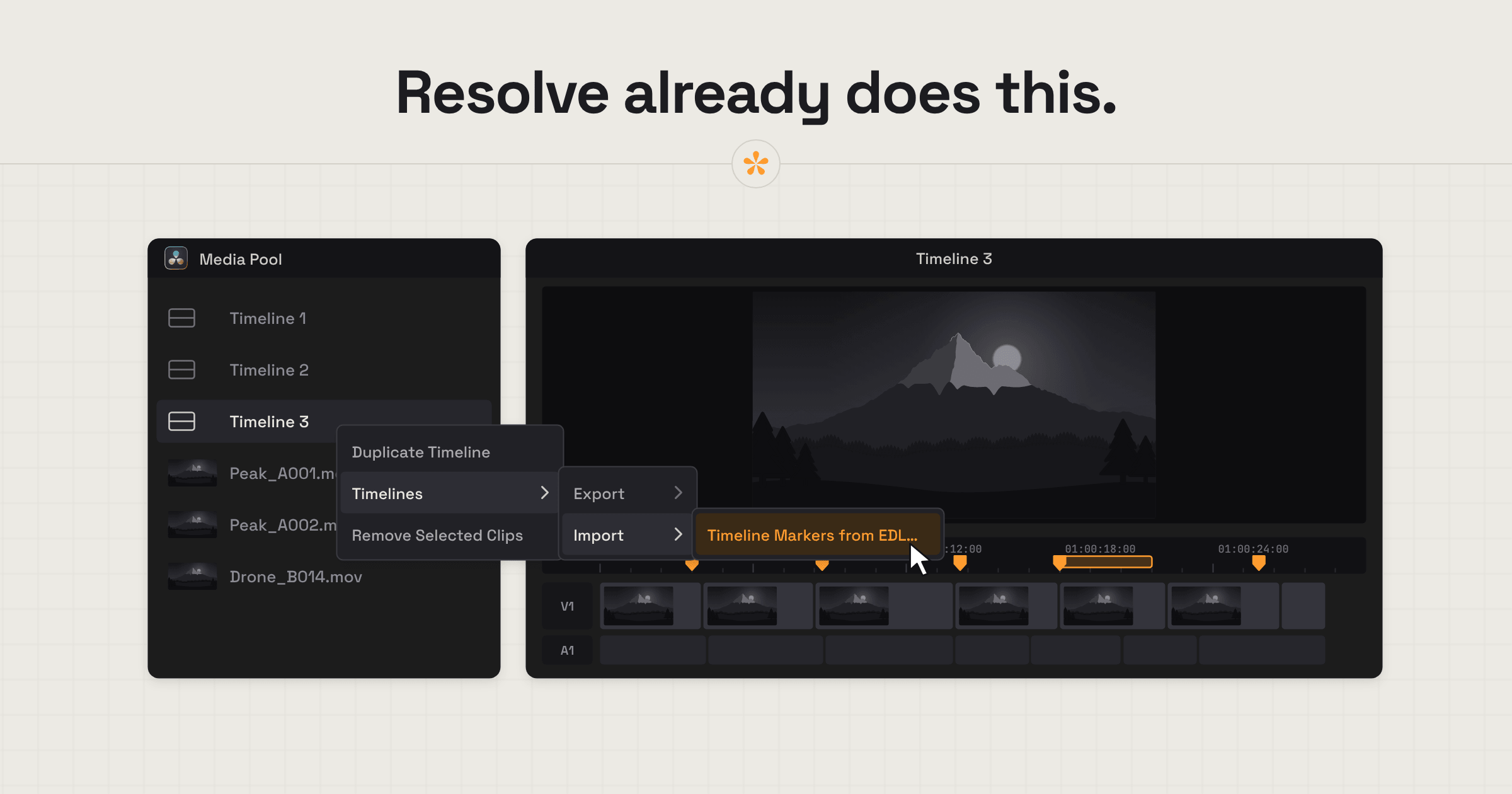
To bring review notes into DaVinci Resolve without Frame.io, collect timestamped client feedback in SceneNote and export it as an EDL file. Import that file into Resolve using Timeline Markers from EDL, and each note appears as a marker at the correct point on your timeline. This works on SceneNote's free plan, too.
ON THIS PAGE · 5 SECTIONS
What's the situation with Frame.io and DaVinci Resolve?
As of October 2026, Frame.io's own help centre files its DaVinci Resolve integration under its legacy (V3) articles. It says the integration is available on Resolve 16 Studio and 17 Studio, and that there have been “no recent updates from Blackmagic for this integration”. If you're on a newer Resolve, or don't use Frame.io, you'll want another way to get review notes onto your timeline.
That's what Resolve's EDL marker import is for. It's built into Resolve, and it works with a file from any review tool that writes Resolve's marker format.
How do you bring review notes into Resolve without Frame.io, step by step?
To bring review notes into DaVinci Resolve without Frame.io, export a Resolve marker file from SceneNote and import it with Resolve's own menu.
- Share the cut on a SceneNote review link. Upload it or paste a link, and send it to your client. They leave notes on the exact frame, with no account.
- Click Markers and choose DaVinci Resolve (.edl).
- Pick your timeline start, 01:00:00:00 (Resolve's default) or 00:00:00:00, and export.
- In Resolve's Media Pool, right-click your timeline and choose Timelines, Import, Timeline Markers from EDL.
- Every note lands as a marker on its frame, yellow while open and green once resolved.
How to import client notes as markers in DaVinci Resolve has the full steps and what each marker shows.
What do you keep, and what's different?
The EDL route keeps the part that matters most, every note on the right frame of your Resolve timeline, but it works differently from an integration panel.
| Frame.io's legacy Resolve integration | SceneNote's EDL markers | |
|---|---|---|
| How notes reach Resolve | Inside Resolve, through a signed-in Frame.io account | A marker file you import with Resolve's own menu |
| Resolve versions | Resolve 16 Studio and 17 Studio, per Frame.io's help centre | Any Resolve with Timeline Markers from EDL import |
| Updates | Live inside Resolve | One import per round: export again when new notes come in |
| Reviewers | Depends on your Frame.io setup | No account, on any plan |
| Cost of the export | Part of a Frame.io plan | Free, on every SceneNote plan |
The honest trade-off: an EDL is a one-way import per round, not a live panel inside Resolve. For most jobs, exporting once per round of notes is all you need.
Who does the EDL route suit?
The EDL route suits Resolve users who want client notes on their timeline without depending on an integration.
- Editors who've moved a job from Premiere to Resolve but still need a way to get client notes onto the timeline.
- Colourists on Resolve receiving notes from clients who've never used Frame.io.
- Resolve users who'd rather not pay for a separate review subscription just to get notes onto the timeline.
- Anyone on a newer Resolve than the integration supports.
FAQ
Is Frame.io still available for Resolve users?
Frame.io works in the browser for any editor. What's changed is the Resolve integration, which Frame.io's help centre lists as legacy, for Resolve 16 Studio and 17 Studio.
Do the markers update automatically?
No. Each export is a snapshot of the notes at that moment. When new notes come in, export again and import the new file.
Does my client need an account?
No. Clients type their name the first time they leave a note, and that's all. There's no account or app.
Does this cost anything?
No. Marker exports are on every SceneNote plan, including the free one.
What's the simplest way to get review notes into Resolve without Frame.io?
Share the cut on a SceneNote review link, click Markers and choose DaVinci Resolve (.edl), then import the file in Resolve with Timelines, Import, Timeline Markers from EDL.
Review notes in Resolve, no integration needed.
Export feedback as timeline markers. Free on SceneNote.
Related guides

Kiril Dobrev
Filmmaker · part of the team behind SceneNote
Kiril Dobrev is a filmmaker with 15 years of experience and a passion for documentary and travel. He’s spent a lot of that time in the editing room, obsessing over how to make his workflow better, and the feedback loop has always been a big part of that. Post-production still hasn’t had a good enough answer to it. SceneNote was born from that, with one simple idea: make feedback better.
More guides by Kiril →